AI Data Handling & Privacy
What data reaches an AI provider, when, and who controls it. Read this before enabling AI Auto-Triage, the AI Copilot, or any AI-powered feature.
/settings/ai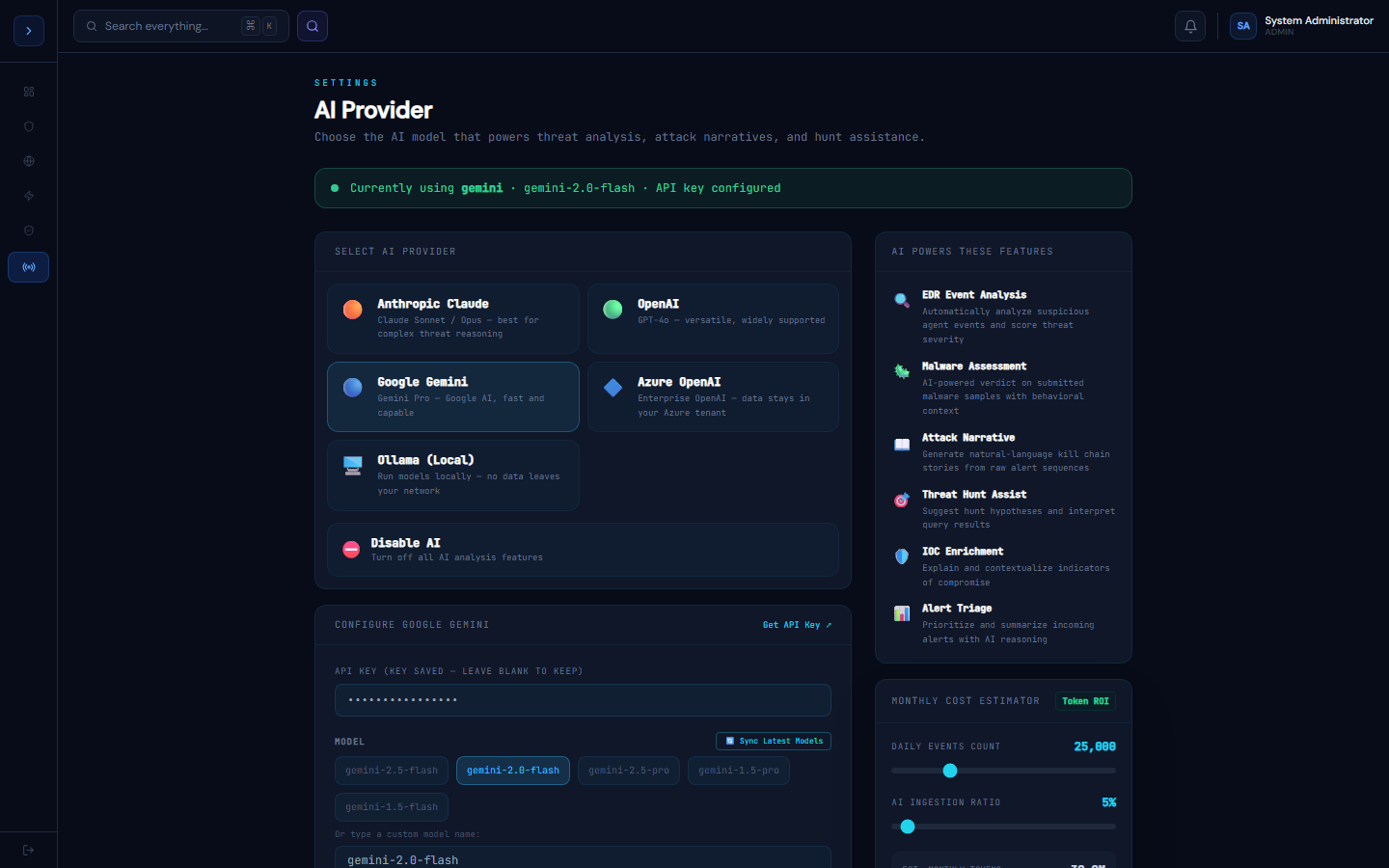
How AI is configured
OverviewNo Default AI Backend
GuardFox Security Systems does not ship with a bundled or default AI provider. Every organization configures its own AI provider and API key under Administration → AI Provider (/settings/ai). Until an org does this, every AI-dependent feature is simply off — nothing is sent anywhere.
Per-organization, not shared
Your AI provider, model choice, API key, and system prompt are stored against your organization only. There is no platform-wide fallback key and no cross-tenant sharing — another organization's AI configuration can never be used for your data, and yours can never be used for theirs.
What gets sent, and when
Data only reaches your configured AI provider when you actively use an AI-powered feature — AI Auto-Triage, Malware Assessment, Attack Narrative, Threat Hunt Assist, IOC Enrichment, Alert Triage, or the AI Copilot chat. Each of these sends only the specific data that feature needs (e.g. a serialized alert, an event summary, or your chat message) — not a broad stream of your telemetry.
Provider options and where your data goes
UsageChoosing a Provider Based on Your Data Requirements
| Provider | Where data goes | Best for |
|---|---|---|
| Anthropic Claude | Anthropic's API, per Anthropic's own data-handling terms | General use |
| OpenAI | OpenAI's API, per OpenAI's own data-handling terms | General use |
| Google Gemini | Google's API, per Google's own data-handling terms | General use |
| Azure OpenAI | Your own Azure tenant — Microsoft's enterprise data-residency commitments apply | Organizations that need data to stay within a specific cloud tenant/region |
| Ollama (Local) | Nowhere — runs on infrastructure you control, no external API call at all | Regulated environments (finance, healthcare, government) that cannot send data to any third-party API |
| Disabled | N/A — every AI feature is turned off | Anyone who wants zero AI data transfer, period |
If your compliance regime prohibits sending data to a public AI API, choose Azure OpenAI (tenant-bound) or Ollama (fully self-hosted, air-gap capable) rather than the direct Anthropic/OpenAI/Gemini options.
Turning AI off completely
Select Disabled in AI Provider settings. Every AI-dependent feature across the platform stops running immediately — this is a full kill switch, not a per-feature toggle.
Your API key
Your configured API key is stored against your organization's record and is never exposed to other tenants or used outside your own AI feature calls. As with any credential you provide to a SaaS platform, treat it with the same care you would any other API key in your environment.