Reports Center
Generate, schedule, and export security reports across all 17 platform modules. 8 export formats including PDF, Excel, STIX, and MISP.
/reports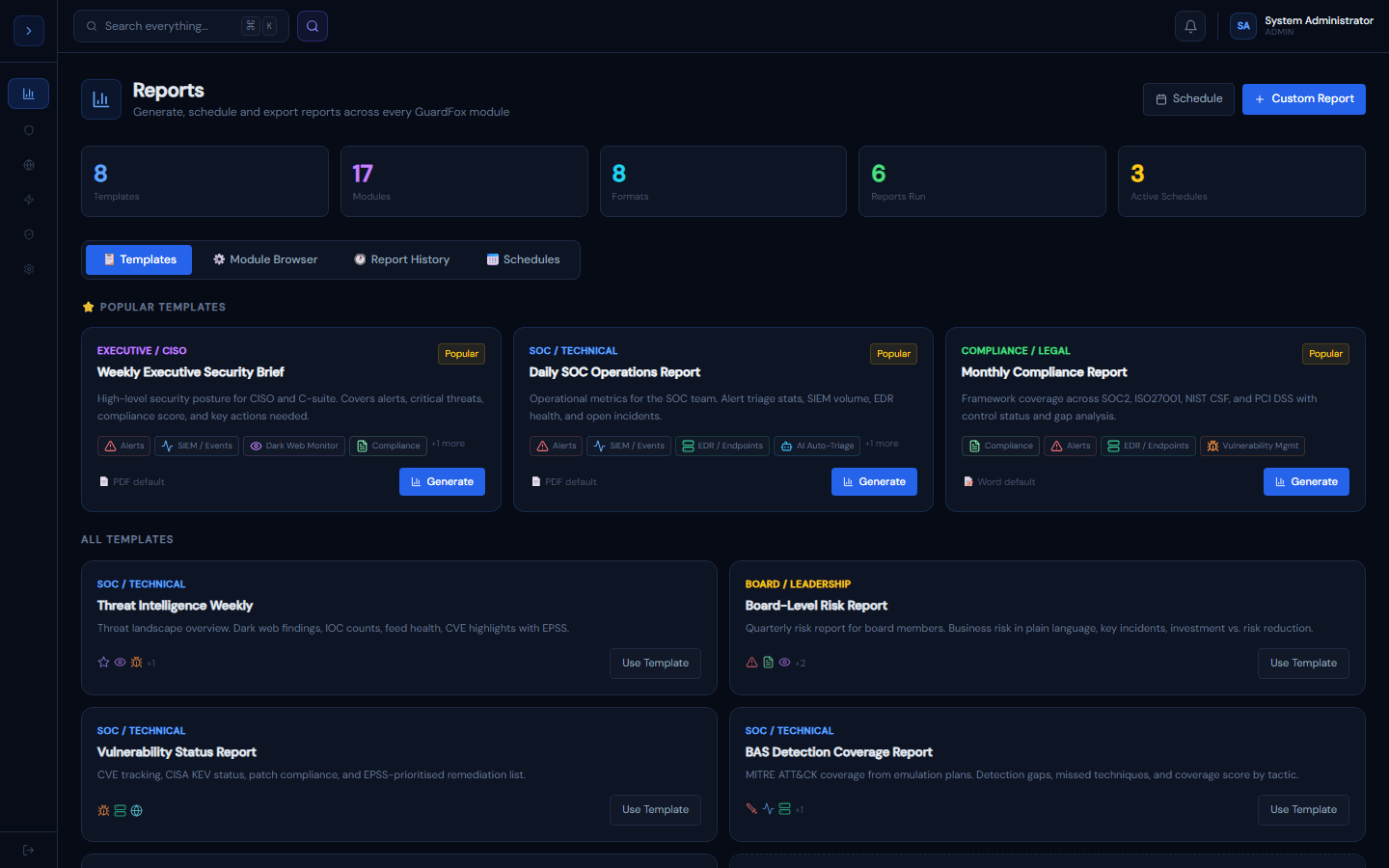
How the Reports Center works
OverviewHow the Reports Center Works
The Reports Center is a unified reporting layer that sits on top of all 17 GuardFox Security Systems modules. It has four main parts:
Templates — 8 pre-built report templates covering every common use case:
- Weekly Executive Security Brief (SIEM + Alerts + Dark Web + Compliance + Vuln)
- Daily SOC Operations Report (Alerts + SIEM + EDR + AI Triage + SOAR)
- Monthly Compliance Report (Compliance + Alerts + EDR + Vuln)
- Board-Level Risk Report (Alerts + Compliance + Dark Web + Vuln + Red Team)
- Threat Intelligence Weekly, Vulnerability Status, BAS Detection Coverage, Endpoint Security
Report Builder — 4-step wizard: pick modules → configure sections and audience → choose formats → download. Multiple formats can be exported in a single run.
Report History — every report is saved with page count, file size, and recipients. Rerun any past report with one click.
Schedules — set reports to run automatically on a frequency (daily/weekly/monthly/real-time) and email to a recipient list.
Audience types
| Audience | Language style | Typical recipients |
|---|---|---|
| Executive / CISO | High-level, risk-focused | CISO, CEO |
| SOC / Technical | Full detail, IOCs, raw data | SOC analysts |
| Compliance / Legal | Control mapping, evidence | Legal, auditors |
| Board / Leadership | Business risk, no jargon | Board members |
Export formats explained
How to useExport Formats
| Format | Best for | Notes |
|---|---|---|
| Executive briefings, stakeholder delivery | Print-ready, non-editable | |
| CSV | Raw data analysis, Excel import | Flat table, one row per finding |
| JSON | SIEM/SOAR webhook integration | Machine-readable, full structure |
| HTML | Web-viewable interactive report | Self-contained, shareable link |
| Word (DOCX) | Board reporting, editable docs | Formatted with tables and headers |
| Excel (XLSX) | Spreadsheet analysis, charts | Multi-tab, formula-ready |
| STIX 2.1 | Threat sharing with partners | Compatible with Splunk, OpenCTI |
| MISP | MISP threat intel platform | Direct event import |
Selecting multiple formats
In the Report Builder Step 3, all 8 formats are shown as checkboxes. Select as many as you need — all are generated in a single run and available for download simultaneously.
STIX export
STIX reports include: threat indicators as indicator objects, alerts as observed-data objects, and MITRE techniques as attack-pattern objects with uses relationships. Import directly into Splunk Enterprise Security or OpenCTI.
Scheduling recurring reports
SetupScheduling Recurring Reports
- Go to Reports → 📅 Schedules → Add Schedule
- Choose a base template (or build a custom one first)
- Set frequency: Real-time | Daily | Weekly | Monthly
- Choose format and audience
- Enter email recipients (comma-separated)
- Click Create Schedule
Recommended schedule set
| Schedule | Frequency | Format | Recipients |
|---|---|---|---|
| Daily SOC Brief | Daily 07:00 | soc@company.com | |
| Weekly Executive Brief | Monday 08:00 | ciso@company.com | |
| Monthly Compliance | 1st of month | DOCX | legal@company.com |
| Threat Intel Feed | Weekly | STIX | Splunk webhook |
| Board Report | Quarterly | DOCX | board@company.com |
Real-time reports
Real-time frequency fires immediately when a new Critical alert is created — ideal for a JSON webhook to your SIEM or PagerDuty. Configure the recipient as a webhook URL in your email field.
Delivery
Reports are emailed via Zoho SMTP, configured with the SMTP_HOST/SMTP_USER/SMTP_PASS environment variables. The PDF is attached directly to the email, not a link. For large reports (>10MB), a download link is sent instead.
All 17 reportable modules
OverviewReportable Modules
Every module in GuardFox Security Systems contributes metrics to reports. Here's what each one provides:
| Module | Key Metrics | Report Types |
|---|---|---|
| SIEM / Events | Events ingested, by source/severity, volume trend | Event Summary, Source Distribution, Timeline |
| Alerts | Created, closure rate, MTTD, MTTC, AI-triaged | Alert Summary, Triage Efficiency, SLA |
| EDR / Endpoints | Online/offline agents, detections, quarantines | Endpoint Health, Threat Detections |
| Threat Intel | IOC count, feed health, VT lookups | IOC Report, Feed Health, Intel Coverage |
| Vulnerability Mgmt | CVEs tracked, KEV matches, patch compliance | Vuln Summary, KEV Report, Patch Gap |
| AI Auto-Triage | Alerts triaged, avg score, false positive rate | Triage Summary, Model Performance |
| SOAR Playbooks | Executions, success rate, actions taken | Playbook Summary, Response Efficiency |
| Deception Engine | Assets deployed, interactions, attacker IPs | Deception Activity, Attacker Analysis |
| Dark Web Monitor | Findings, credential leaks, records exposed | Dark Web Summary, Credential Exposure |
| Attack Surface | Assets discovered, exposures, expiring certs | Surface Summary, Exposure Report |
| Compliance | Controls met %, framework gaps | Compliance Summary, Evidence Report |
| Red Team / BAS | Detection coverage %, gaps by tactic | BAS Summary, Detection Gap, MITRE |
| UEBA | Anomalies detected, flagged users | UEBA Summary, User Risk Report |
| DNS Monitor | DGA detections, tunneling alerts | DNS Summary, DGA Report |
| Cloud Posture | Misconfigs, compliance score | Cloud Posture Summary |
| Bot Management | Bot traffic %, blocked requests | Bot Traffic Summary |
| Shift Reports | Alerts/shift, closure rate, SLA breaches | Shift Summary, Trend Analysis |